Tag: technology

  • Apple Opens Its First Store In Hong Kong IFC

    Apple Opens Its First Store In Hong Kong IFC – It’d been a long wait for Apple fans in Hong Kong to visit a real Apple Store, officially from Cupertino based Apple computer. There are currently 5 stores in Mainland China and this one at the Hong Kong’s tallest tower, International Finance Centre (IFC) marks the first store in Hong Kong SAR (Special Administration Region) of China.

    Featuring the Apple’s interiors design concept, a spacious interiors with minimalist furniture, well lighted with huge amount of natural lighting from the glass panel. as well as the famous spiral stair case same as the one at 5th Avenue, New York. First floor is where all the Apple’s products are showcase and the 2nd floor is where you consult for technical issue and where the Genius Bar is located.

    At the opening, Apple gives out 5000 free t-shirt to fans and I want one too! Too bad, I am not in Hong Kong now.

    Well, this means that the Apple Store is now added to my place-to-visit-in-Hong-Kong list in my next visit to Hong Kong somewhere during Winter.

    [youtube http://www.youtube.com/watch?v=09lN9ho47Q4&w=640&h=360]

    [image from micgadget.com]

  • Apple’s iPhone 5 Event On October 4

    iphone-5-vs-iphone-4

    Apple’s iPhone 5 Event On October 4 – Tuesday, October 4 2011 is the day where Tim Cook, the new CEO of Apple will step onto the stage and announce the new iPhone 5. It sounds just so delicious, that this news is not 100% confirm but was reported by Wall Street Journal’s All Things D.

    It was reported that Apple will hold the next big media event on the date above with the announcement of the next iPhone 5 and iPod series. In previous years, Apple announced iPhone during WWDC and iPod in a media event in September but this year, it’d been a little bit later.

    Rumors speculating shows that the iPhone 5 will sports the Apple A5 processor, 8mp camera, bigger screen and iOS 5 firmware.

    All eyes are looking at Apple right now to officially announce the event and I am just waiting for it, anxiously and excitedly. Mark your calendar now and wait. Latest news will be updated here in this blog too.

    [SOURCE | image by All Things D]

  • Facebook Timeline – The New Facebook Profile

    Facebook Timeline - The New Facebook Profile

    Facebook Timeline – The New Facebook Profile – In the previous post, I wrote about How To Get Facebook Timeline. Now I would like to tell you what is this Timeline all about. Just yesterday at Facebook F8 Developer Conference, Mark Zukerberg announced several new features for the Facebook, one of which is the Facebook Timeline profile.

    Screen Shot 2011-09-23 at 3.44.21 PM

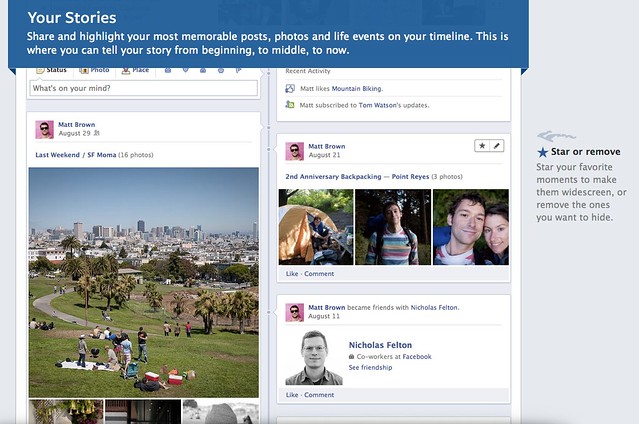
    Timeline is the new Facebook profile that tell the story of your life in a timeline view. It’s a complete redesign of the current profile page, with your wall posts and updates posted side by side down to the screen. It’s easier to find older post than before that you can just click on the month or year of the post you want to look.

    Screen Shot 2011-09-23 at 3.44.33 PM

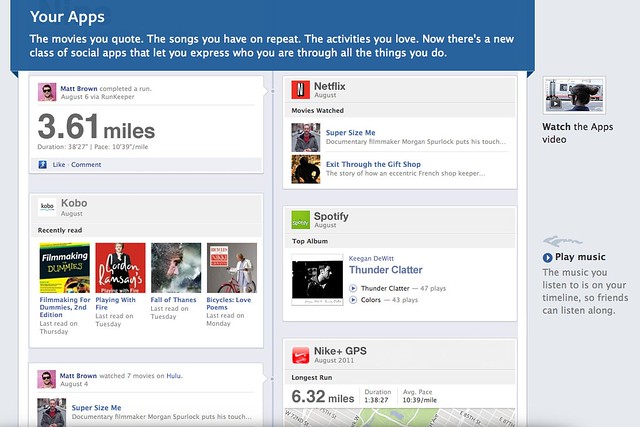
    It’s something that you can record your memory or just like your historical scrapbook. You share your photos, or even do more with Apps like you can share the songs you are listening, the movie you are watching, a book that you are reading or even your running tracks.


    Screen Shot 2011-09-23 at 3.44.08 PM

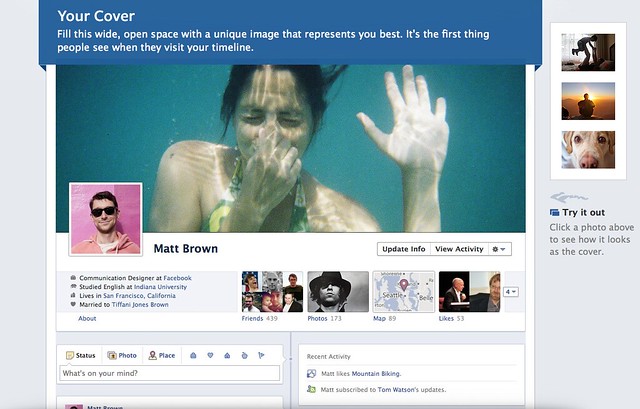
    Everything become more social. The interface is really cool with a featured cover photo at the top which you can change anytime. The cover photo is for you to show the people who you really are, like showing your favourite traveling photo, put a delicious food photo to show that you like to eat, a huge profile picture of you or anything you just like.

    [youtube http://www.youtube.com/watch?v=hzPEPfJHfKU]

    The interface is nice, somehow privacy get exposed as people can stalk and read about you easily. So hopefully Facebook will do something to protect the privacy of the user too. Do tell me what you think in the comment.

    If you want to activate the new Timeline feature, check out this post.

  • How To Get Facebook Timeline Now

    How To Get Facebook Timeline Now

    How To Get Facebook Timeline Now – Facebook just announced a new profile page that is coming soon at the recent Facebook F8 Developer Conference and Mark Zukerberg called it the Facebook Timeline. It has not release yet and no open beta for normal user to try out, however if you have a developer account using Open Graph API, you will be able to try it out first.

    It will be available soon for normal user but if you really want to try out, you can join the developer program too and get your hands on the new Facebook Timeline profile.

    Follow the steps below and you will be in the new Facebook in no time.

    1. Go to Facebook Developer page, you can click here or type “developer” in your Facebook search bar then enable it for your account.

    2. At the Apps page, click on Create New App that we are going to make an app but with no functionality just for trying the new Facebook Timeline.

    3. Type your name or whatever name you want to name for your app at both blank. Please type normal case for App Display Name and small case for App Namespace.

    5. After creating your app, you will be taken to the Open Graph page (if not, you can click Edit App then navigate to Open Graph). Then, define an action for your app, just simply type a verb and noun, just like mine “find (a) job”. Follow the on screen instruction, click Continue and Continue until you are done.

    6. Finally when you are done, go back to your Facebook main page, and you will get an invitation for you to try out the new Facebook Timeline.

    Enjoy. Only people with Facebook Timeline activated can be view your Timeline profile. Pretty right?

  • Soon You Can Replace Yale Key With NFC-enabled Phone

    Soon You Can Replace Yale Key With NFC-enabled Phone

    Soon You Can Replace Key With NFC-enabled Phone – NFC-enabled is getting more and more popular. NFC also stands for Near Field Communication which is a wireless signal just like what you use for your metro card like the Touch N’ Go (Malaysia), EZlink (Singapore), Octopus Card (Hong Kong) and Pearl Card (UK).

    The world top key and lock manufacturer, Yale Locks & Hardware has just unveiled a new door lock that can be unlocked with a NFC device. What’s demoed in the video is an iPhone with an extra accessories which serve as the NFC adapter, unlocks a door lock. Soon it will hit the US market, but no news about Asia yet. Check out the video to know more.

    [youtube http://www.youtube.com/watch?v=nkBODXyk0S8&w=640&h=360]

    I wonder is it safer or normal metal key safer? What do you think?

    [SOURCE]

  • NetSentry – Monitor Your Data Usage On Android

    NetSentry – Monitor Your Data Usage On Android – I’ve realized that my Nexus One uses a lot of data. Although I do have a data plan, but sadly, it’s not unlimited, I only have the 500mb data plan and unlimited data plan is rather expensive for Maxis. I turned of Gmail syncing and now it only auto sync Calendar and Contact.

    I need to test use for another month to see whether 500mb is enough for me or not. The only thing I must not do to make sure that I won’t use a lot of data is Youtube, as you know Youtube sucks a lot of data.

    NetSentry - Monitor Your Data Usage On Android

    Unlike my old Nokia N95, there’s no data counter on the Android. But after some searching in the Market, I found an application that can shows how much data you have used and auto resets every month. It’s called NetSentry, better than NetCounter IMO.

    I set 500MB data limit, so I assume there will be a notification when reaching the limit. Hopefully, 500MB is enough for me or Maxis must revise their data plan rate.

    Scan the QR code with your Android barcode reader or click here to download.

  • Download Google+ For Android In Malaysia Now

    [youtube http://www.youtube.com/watch?v=N8gvHaX1cwY&w=640&h=360]

    Download Google+ For Android In Malaysia Now – Google+ For Android app was available in the US region only and now has come to Malaysia. Some people have been using it through manual apk download from the net, but now you can download right from the Malaysia’s Android Market. If you are into Google+ then this is the app for you.

    One question, are you still using Google+?

    [SOURCE]

  • Check Out The Windows Phone Mango

    Check Out The Windows Phone Mango

    Check Out The Windows Phone Mango – Windows Phone Mango is the next update for Windows Phone 7 that is coming very soon, it’s just like the iOS updating from 4.0 to 5.0, Android’s Gingerbread to Ice Cream Sandwich.

    [youtube http://www.youtube.com/watch?v=cBISUhRIiSE&w=640&h=360]

    Check out the video about the Windows Phone 7.5, also known as Windows Phone Mango which features the beautifully designed UI like the Metro Design and Live Tiles. It shows that mobile phone UI can be different from others. The font used and the way app is designed make it look well-organize, clean and pretty.

    It’s looking good, but app support is still limited. Let’s see how it will compete with the Android and iOS when it’s released.

  • U Mobile Offers Samsung Galaxy S2 From RM849

    307578_288642081162275_197196360306848_1217000_1511509058_n

    U Mobile Offers Samsung Galaxy S2 From RM849 – Latest news shows that U Mobile has join in the Samsung Galaxy craze by offering the famous Samsung Galaxy S2 together with the big 3 – Maxis, Celcom and DiGi with a price starting from RM849. The price is entitled when signing up the U Mobile’s U Premium Plan with 24 month contract.

    As comparison, Maxis offers the Galaxy S2 from RM1399, DiGi from RM1349 while Celcom from RM1208. So you can see that U Mobile has the lowest price, but a higher monthly commitment fee of RM168/month.

    Check out the Facebook page for more.

    [SOURCE]

  • Japanese Funny And Awesome Windows Phone Commercial

    Japanese Funny And Awesome Windows Phone Commercial

    Japanese Funny And Awesome Windows Phone CommercialMobile phone‘s TV commercials are always very standard, like showing off the features, the design and that’s all. The Japanese is really good at producing TV commercial and check out this Windows Phone commercial which I think it’s real funny and awesome. Most important is that the funny moment keeps playing in my head which makes their ad successful.

    [youtube http://www.youtube.com/watch?v=EIz4C93i-U8&w=640&h=390]

    Although it’s still showing off its feature design and more, though it’s very innovative that finding a comedian/joker to talk about the phone. Look at his expression, his action and his way of talking, really funny.

WP2Social Auto Publish Powered By : XYZScripts.com