Tag: facebook

  • BREAKING: Apple’s October 4th iPhone 5 Event Confirmed

    BREAKING: Apple's October 4th iPhone 5 Event Confirmed

    BREAKING: Apple’s October 4th iPhone 5 Event Confirmed – Latest update on the upcoming rumors Apple event which to be held on October 4th, 2011 is now confirmed by Apple. The event will be held at Apple HQ in Cupertino, California at 10.00 AM Pacific Time (1am Malaysia Time, Wednesday October 5th).

    It is known that Apple will be announcing about the next generationg iPhone (iPhone 4S, iPhone 5 or both) at the event, and is also expected to include updates on the iPod line. Besides, iOS 5 will be also debuting at the event. Apple has skipped the iPhone discussion in recent WWDC. Other reports have also shows that Facebook may launch its iPad app at the event too.

    Anyway, it will be an exciting event after a long wait and speculation of rumors around the Internet. All eyes are on the iPhone now.

    Are you excited?

  • Stand A Chance To Win A Nokia Symbian Belle Phone

    Screen Shot 2011-09-27 at 7.53.44 PM

    Stand A Chance To Win A Nokia Symbian Belle PhoneNokia is having a contest right now where you can win the latest Symbian Belle powered phone, a Nokia 700, Nokia 701 or Nokia 600 by just answering a Nokia related question. There will be 19 units of phone to be given out for the next 19 days. All you have to do is just answer the question of the day at Nokia’s Facebook page and you will be in the draw for the Symbian Belle-powered phone.

    Screen Shot 2011-09-27 at 7.53.50 PM

    The question is pretty simple which you can actually Google on the Internet for it. Just try your luck and who knows, you might be lucky one who wins away one of the latest phone by Nokia. Just visit the Facebook page to know more and you are on your track for a new Nokia mobile phone.

    [SOURCE]

  • Facebook Timeline – The New Facebook Profile

    Facebook Timeline - The New Facebook Profile

    Facebook Timeline – The New Facebook Profile – In the previous post, I wrote about How To Get Facebook Timeline. Now I would like to tell you what is this Timeline all about. Just yesterday at Facebook F8 Developer Conference, Mark Zukerberg announced several new features for the Facebook, one of which is the Facebook Timeline profile.

    Screen Shot 2011-09-23 at 3.44.21 PM

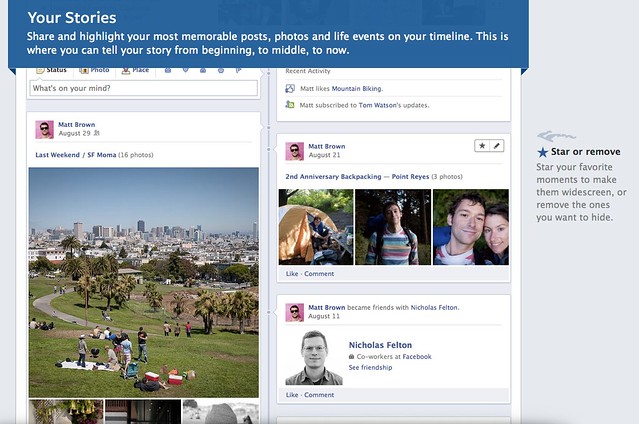
    Timeline is the new Facebook profile that tell the story of your life in a timeline view. It’s a complete redesign of the current profile page, with your wall posts and updates posted side by side down to the screen. It’s easier to find older post than before that you can just click on the month or year of the post you want to look.

    Screen Shot 2011-09-23 at 3.44.33 PM

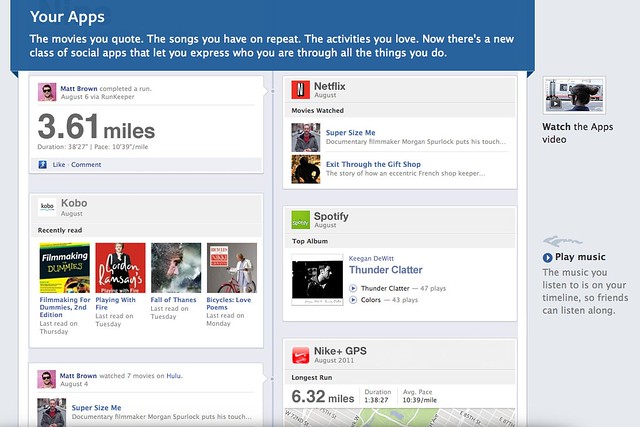
    It’s something that you can record your memory or just like your historical scrapbook. You share your photos, or even do more with Apps like you can share the songs you are listening, the movie you are watching, a book that you are reading or even your running tracks.


    Screen Shot 2011-09-23 at 3.44.08 PM

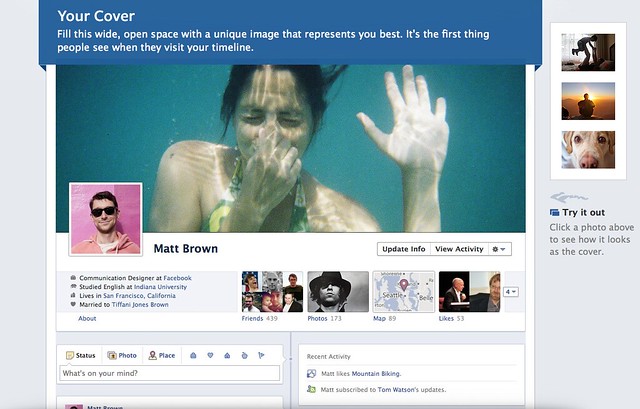
    Everything become more social. The interface is really cool with a featured cover photo at the top which you can change anytime. The cover photo is for you to show the people who you really are, like showing your favourite traveling photo, put a delicious food photo to show that you like to eat, a huge profile picture of you or anything you just like.

    [youtube http://www.youtube.com/watch?v=hzPEPfJHfKU]

    The interface is nice, somehow privacy get exposed as people can stalk and read about you easily. So hopefully Facebook will do something to protect the privacy of the user too. Do tell me what you think in the comment.

    If you want to activate the new Timeline feature, check out this post.

  • How To Get Facebook Timeline Now

    How To Get Facebook Timeline Now

    How To Get Facebook Timeline Now – Facebook just announced a new profile page that is coming soon at the recent Facebook F8 Developer Conference and Mark Zukerberg called it the Facebook Timeline. It has not release yet and no open beta for normal user to try out, however if you have a developer account using Open Graph API, you will be able to try it out first.

    It will be available soon for normal user but if you really want to try out, you can join the developer program too and get your hands on the new Facebook Timeline profile.

    Follow the steps below and you will be in the new Facebook in no time.

    1. Go to Facebook Developer page, you can click here or type “developer” in your Facebook search bar then enable it for your account.

    2. At the Apps page, click on Create New App that we are going to make an app but with no functionality just for trying the new Facebook Timeline.

    3. Type your name or whatever name you want to name for your app at both blank. Please type normal case for App Display Name and small case for App Namespace.

    5. After creating your app, you will be taken to the Open Graph page (if not, you can click Edit App then navigate to Open Graph). Then, define an action for your app, just simply type a verb and noun, just like mine “find (a) job”. Follow the on screen instruction, click Continue and Continue until you are done.

    6. Finally when you are done, go back to your Facebook main page, and you will get an invitation for you to try out the new Facebook Timeline.

    Enjoy. Only people with Facebook Timeline activated can be view your Timeline profile. Pretty right?

  • How To: Install Facebook For iPad App

     How To: Install Facebook For iPad App

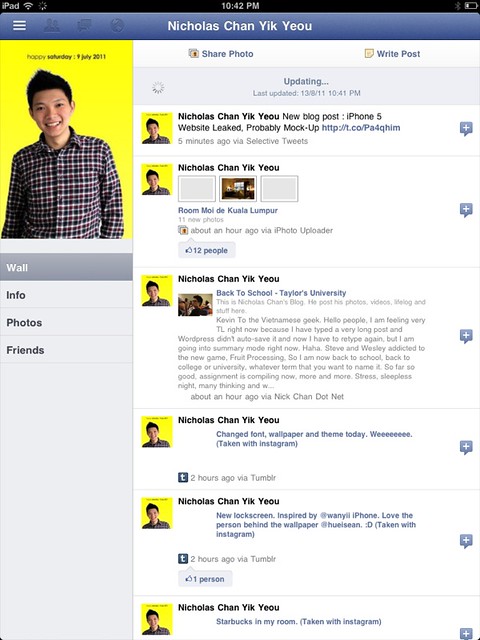
    How To: Install Facebook For iPad App – Facebook has released a leaked version of Facebook for iPad app in July. It was blocked by Facebook in less then a day and I couldn’t login to the Facebook for iPad app anymore. However, I have found a solution on how to access it and have been using it for a few days already.

    Some have ask me where to download the Facebook For iPad app but then you don’t really need to download it as you already have it if you have the latest version of Facebook for iPhone on your iPad. You just need to do some tweak to change your Facebook to the iPad version.

    One thing you must have is a JAILBROKEN iPad. Follow the instruction below to get your Facebook for iPad app. (Thanks to TNW).

    1. Check for updates to make sure you have the latest version of Facebook from the App Store. Also, backup your iPad in iTunes.
    2. Visit jailbreakme.com from your iPad. Jailbreaking your iPad is legal, but voids your warranty if you bring your iPad into an Apple Store. It’s easy to undo if need be. Just pug your iPad into your computer and restore it from your previous backup. (If you are running iOS 4.3.3, this will NOT work.)
    3. Once the jailbreak process is complete, tap on Cydia, that was just installed on your iPad.
    4. Tap the Search tab in Cydia and search for iFile. Download it using the button in the upper right hand corner.
    5. Once iFile installs, open it up, and navigate to the “var” folder of your iPad. Then go to “mobile,” then “applications,” then “directory.”
    6. Click the settings gear icon in the bottom navigation bar and turn “Application Names” to “On.”
    7. Open the Facebook folder within the “directory” folder you’re inside of. Once you’re inside the Facebook folder, open Facebook.app.
    8. Look for the info.plist file, then open it. Pick “Property List Viewver” to view the hexadecimal settings for the Facebook app.
    9. Look for the UIDeviceFamily field and select it.
    10. Delete the 1 you see, and put a 2 in instead. Tap “Done” to complete the process.
    11. Hold down your power button to reboot your iPad.
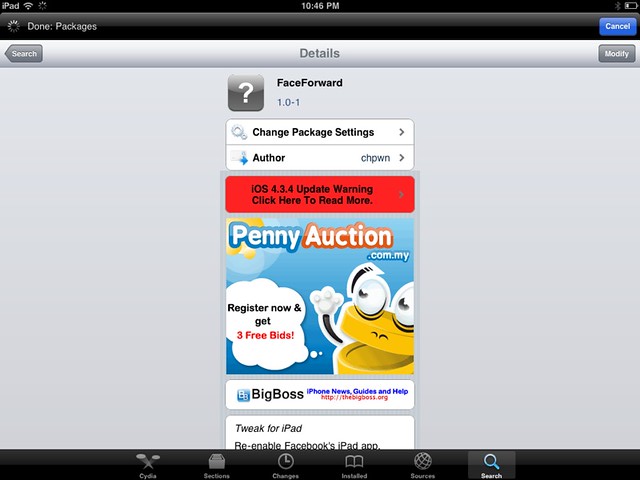
    12. Then go to Cydia again and seach for Faceforward.
    13. Download and install it.
    14. Launch your new Facebook app and you are now in.


    Cydia hack to allow you to login to Facebook.

    It’s a little bit buggy, Page is not working as it crashes but overall it looks good. But if were to compare to MyPad, MyPad seems better than this. Tell me what do you think after trying it.

  • Nick Chan Dot Net Facebook Like Page

    In order to be closer to the Facebook community and you guys, my friends and family, I created a Facebook Like Page so that the latest update of my blog and writting will send straight to you. Just a little click on the “Like” button and it’s awesome. =)


WP2Social Auto Publish Powered By : XYZScripts.com