Tag: PPS

  • PPS.tv Now Available On Mac


    PPS.tv Now Available On Mac
    #1: PPS.tv’s download page.

    PPS.tv Now Available On Mac – After the long wait, PPS.tv, the famous Chinese movie streaming software is now available on the Apple’s Macintosh OS. The software is a P2P movie streaming software which features lots of Asian and International’s movies and drama which can be watched on-demand.

    Screen Shot 2011-10-15 at 1.17.13 PM
    #2: Screenshot of the application.

    It’d been a heat on the Windows. Previously, I watched PPS through Parallel Windows on my Mac but now I have no reason to boot Windows on my Mac to watch it. The whole experience is just the same as the one on Windows if you have used it before. If you haven’t, you should try it out if you can read Chinese.

    Screen Shot 2011-10-15 at 1.16.56 PM
    #3: Icon on the dock.

    Screen Shot 2011-10-15 at 1.16.35 PM
    #4: Installation is simple as ABC.

    Setup is pretty easy, just drag and drop into the Application folder from the *.dmg package. You need not to set anything to display Chinese font and no add-on software, it’s so much easier than on the Windows.

    Enjoy your PPS on Mac now, head over here to download now.

  • How to read Chinese in PPS.tv

    How to read Chinese in PPS.tv – PPS.tv is a great Chinese P2P video streaming program, there’s so much show to watch on demand, from Chinese show to American show to Japanese show and more. It’s fast and it’s clear but it’s a Chinese program.

    How to read Chinese in PPS.tv

    A lot of friends have been asking me why they can’t read the word in PPS.tv program, it shows up as square square in the left sidebar. At first I got this problem too, after searching around the Internet, I still got no solution, so I went to mess around with the setting and finally I got it works.

    Fullscreen capture 6162009 102253 PM.bmp by nicholaschan.

    It works the same on Vista and XP. Go to the Control Panel and look for Regional Language Setting.

    Fullscreen capture 6162009 102232 PM.bmp by nicholaschan.

    There’s 4 tab on Vista and 3 tabs on XP in this window. Go to the last tab, then change the Language for non-Unicode program to Chinese (PRC). Restart your computer and you are ready to watch your favourite show now.

    Good luck.

  • Watch TVB Series On PPS Without Playlist / 如何看PPS港台剧场

    6

    I was always a fan of the Chinese TV streaming software PPS.tv but not until lately that they started to remove some channel and playlist like the American TV Series (歐美劇場) and now the Hong Kong’s TVB TV Series (港臺劇場). It’s quite sad that I can’t watch most of my favourite show on it.

    This is probably because of copyright issue with the software but I don’t really care, I just want to watch TV series because my country, Malaysia is slow.

    Lately, I have found a solution to watch TVB series on PPS even the playlist is not showing, thanks to RYANTCWBBY.

    Screen shot 2011-04-20 at PM 09.09.12

    Actually RYANTCWBBY is not a plugin or software, it’s a website that provide the secret link to the TVB series playlist in PPS. Basically you don’t really update your playlist but you go to the website to download the link and open on PPS. Here’s the tutorial.

    1. Go to RYANTCWBBY website (Scroll down for new link). Then look for the available TV series on the sidebar that look like this.

    5

    2. Let’s say I want to watch the new 點解阿SIR係阿SIR, I click on the link picture then I will be brought into the other page. Scroll down and you will see the below screen shot. Select your option, IE-based is for Internet Explorer user and Non-IE for Firefox and other user like me.

    Screen shot 2011-04-20 at PM 09.09.36

    3. Then a pop-up will ask you to launch PPS TV software. No need to download anything. That’s all. Simple enough.

    Screen shot 2011-04-20 at PM 09.09.53

    4. Finally, start watching your TVB, streaming from PPS server, but without finding it in the playlist.

    Enjoy TVB series and thanks to RYANTCWBBY. =)

    UPDATE! RYANTCWBBY CHANGED TO PPSX

    New update for the site. RYANTCWBBY has change their link to PPSX.co.cc. Be sure to change your bookmark. =)

    Screen shot 2011-05-19 at PM 09.11.32

    It’s the same thing and happy watching! =)

    1. Go to RYANTCWBBY website. Then look for the available TV series on the sidebar that look like this.
  • How To Show American TV Series Playlist On PPS / 如何看PPS欧美剧场

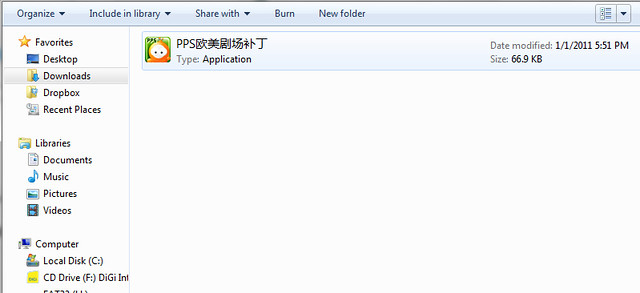
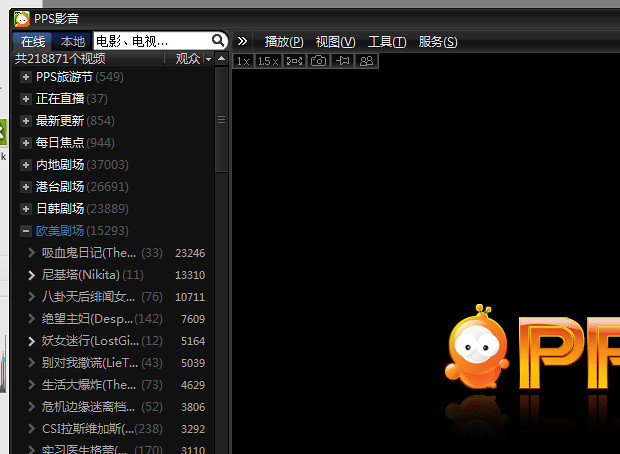
    How To Show American TV Series Playlist On PPS / 如何看PPS欧美剧场 – Due to some copyright infringement, the Chinese top video-on-demand streaming software, PPS.tv removed the playlist of American TV Series (欧美剧场). After some workaround and searching on the Internet, there’s actually a way to go around it and re-show the playlist.

    How To Show American TV Series Playlist On PPS / 如何看PPS欧美剧场

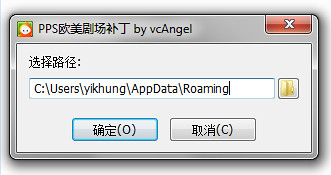
    Just download the patch here. Extract or unzip it, then just run the patch.

    Fullscreen capture 1232011 93259 PM.bmp by nicholaschan

    Press on the first option which means confirm, then the playlist will be back into your PPS.tv again.

    Fullscreen capture 1232011 93330 PM.bmp by nicholaschan

    Simple as that and they are back. =) Good luck, I don’t know whether PPS.tv will fully removed that or not, so for the mean time, let’s use the patch first.

WP2Social Auto Publish Powered By : XYZScripts.com